Arrow Step Infographic Presentation: A Practical Tool for Streamlined Business Visuals
When preparing a business presentation, the gap between raw data and a clear message often comes down to structure. An Arrow Step Infographic Presentation is a slide-based template designed to guide an audience through sequential information—whether that is a process, a timeline, a strategic plan, or a series of steps—using arrow-based visual cues. Rather than relying on static bullet points, this presentation format uses directional shapes to show progression, making it easier for viewers to follow the narrative arc of your content.
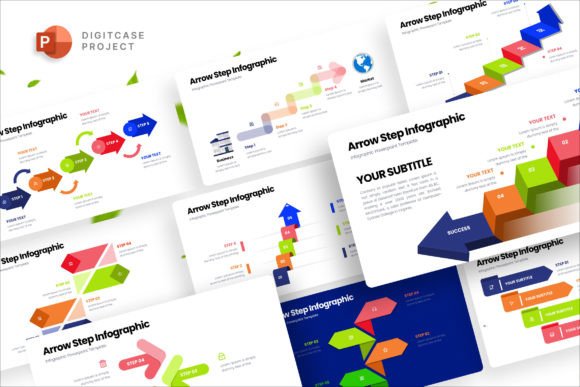
This type of template is built around the premise that clarity and visual consistency save time for both the presenter and the audience. The Arrow Step Infographic Presentation discussed here includes 24 slides, a 16:9 HD ratio, vector-based elements, and full editability without requiring graphic design skills. Below, we evaluate what this format offers, where it works best, and what tradeoffs you should consider before adopting it for your next project.
What the Arrow Step Infographic Presentation Includes
The core value of this template lies in its structure. Each of the 24 slides follows an arrow-step motif, meaning the layout is built around directional arrows that connect stages or phases. All elements are vector shapes, which allows you to resize, recolor, or reposition them without losing quality. The template also includes master slide options, so changes made to the parent slide propagate across all child slides, saving time when adjusting themes or brand colors.
Key features of the Arrow Step Infographic Presentation include:
- Full responsive 16:9 HD ratio – Slides are optimized for widescreen displays, projectors, and digital screens without cropping or distortion.
- Vector shape all elements – Every icon, arrow, and graphic is a vector, meaning you can change colors, sizes, and orientations freely. This is particularly useful when aligning with corporate brand guidelines.
- Master slide options – Edits made to the master slide apply to all slides that inherit it, reducing manual repetition.
- Drag and drop to upload images – You can insert your own photos or illustrations directly into placeholders, which are pre-positioned for balanced composition.
- Free font used – The template uses a freely available typeface, so you do not need to purchase additional licenses.
- Documentation included – A guide explains how to set colors, swap images, and navigate the slide structure.
Because no graphic design skills are required, this template is aimed at professionals who need a polished look without outsourcing the work. The documentation walks through the basic editing steps, making it accessible to users who are comfortable with standard presentation software.
Why Consider an Arrow Step Infographic Template
The primary reason to use an Arrow Step Infographic Presentation is efficiency. Instead of designing a progression diagram from scratch, you inherit a tried layout that already accounts for visual hierarchy, spacing, and alignment. For recurring presentations—such as quarterly reviews, product roadmaps, or training modules—having a consistent template reduces setup time and ensures that each slide follows the same visual logic.
Another benefit is audience comprehension. Arrow-based layouts naturally imply sequence and causality. When viewers see a horizontal or vertical arrow path, they understand that information flows from left to right (or top to bottom) and that each step builds on the previous one. This can be especially helpful when presenting complex multi-stage processes, such as a sales funnel, a project timeline, or a decision tree.
That said, there are tradeoffs. A template with 24 slides and a fixed arrow motif may feel restrictive if your content does not fit a linear structure. For example, comparative analyses, matrix grids, or branching decision paths often require non-linear layouts. In those cases, forcing content into arrow steps can oversimplify the message or require extensive customization that negates the time savings.
Where This Template Excels
The Arrow Step Infographic Presentation is a strong fit in several common business scenarios:
- Process walkthroughs – If you need to explain a step-by-step workflow, such as an onboarding sequence or a quality assurance pipeline, the arrow format mirrors the logical flow.
- Strategic roadmaps – Annual plans, product launches, and project phases benefit from the sequential layout because stakeholders can see the order and dependencies at a glance.
- Timeline presentations – Historical data, project milestones, or future projections can be plotted along an arrow axis, giving each point a clear temporal position.
- Training and education – Instructional content that follows a logical progression—from foundational concepts to advanced topics—maps naturally onto step-based slides.
- Internal communications – Teams that need a quick, consistent format for weekly updates or status reports can reuse the template without reinventing the layout each time.
In each of these situations, the template reduces the cognitive load on the audience. Instead of decoding a custom diagram, they can focus on the content because the visual format is predictable and coherent.
When Alternatives May Be Worth Considering
Despite its advantages, the Arrow Step Infographic Presentation is not a universal solution. You may want to consider alternatives if your needs fall into the following categories:
- Non-linear content – Presentations that compare options, show branching outcomes, or require spatial layouts (such as Venn diagrams, matrices, or org charts) may be better served by a template designed for those specific structures.
- Data-heavy slides – If your primary goal is to display large tables, statistical charts, or complex data visualizations, an arrow-step layout may crowd the information or force data into an unnatural flow.
- Highly creative or branded storytelling – For pitches or marketing decks where visual distinctiveness is a priority, a generic arrow template might look too similar to competitor presentations. Custom-designed slides or a more flexible template could better reflect your brand identity.
- Minimalist design preferences – Some presenters prefer a very clean, text-light approach with ample white space. While the template is editable, its default arrow shapes may still feel visually busy if you aim for a sparse aesthetic.
- Collaborative editing – If multiple team members need to edit slides simultaneously or across different software platforms, a vector-heavy template may sometimes introduce compatibility issues with older presentation software versions.
In these scenarios, you might explore alternatives such as modular infographic kits, chart-based templates, or fully custom slide decks built by a designer. The tradeoff is time and cost: a custom deck offers uniqueness but requires more upfront investment, while a tailored template for a specific chart type may limit your flexibility later.
Practical Decision-Making Insights
To determine whether the Arrow Step Infographic Presentation aligns with your goals, consider the following evaluation framework:
- Map your content first. Before looking at slides, outline your key messages and how they relate to each other. If your narrative naturally follows a sequential path (first, second, third), the arrow step format will likely support it. If your content branches or compares multiple dimensions, you may need a different structure.
- Assess your audience. Stakeholders who value clarity and efficiency—such as executives reviewing quarterly results or trainees following a process—will appreciate the guided flow. Audiences expecting creative, visual storytelling may prefer a less formulaic approach.
- Test editability. Because the template is fully vector-based and includes master slides, you can quickly change colors to match your brand. Set aside 30 minutes to test recoloring a few slides and inserting placeholder images. If the process feels intuitive, the template is a good fit for your skill level and workflow.
- Consider frequency. If you give the same type of presentation repeatedly—monthly status updates, recurring client briefs, or internal training sessions—the time saved by reusing the template compounds with each use. For one-off, high-stakes presentations, a custom design may offer more impact.
- Balance consistency with flexibility. The template provides consistent visual language across 24 slides, which builds coherence. However, if you need to deviate heavily from the arrow motif for certain slides, you may end up fighting the template rather than being helped by it. In that case, a modular template with interchangeable components could be more practical.
One common oversight is assuming that a template eliminates the need for content planning. Even with a polished layout, your message is only as strong as the information you place in each step. Poorly worded headings or overly dense text can undermine the visual structure. Treat the template as a scaffold—it supports your content but does not replace the need for clear writing and logical sequencing.
Final Considerations for Your Decision
The Arrow Step Infographic Presentation offers a practical middle ground between a fully custom deck and a basic bullet-point slide set. Its vector elements, master slide controls, and documentation make it accessible to non-designers, while the sequential layout helps audiences follow a logical progression. For business professionals who regularly present processes, timelines, or step-by-step plans, this template can save considerable preparation time and improve audience comprehension.
However, it is not a catch-all. If your content is non-linear, data-heavy, or requires a highly distinctive visual identity, you may be better served by a different tool. The key is to evaluate the structure of your information first and then choose the presentation format that matches that structure—rather than the other way around.
By focusing on how the Arrow Step Infographic Presentation fits into your existing workflow, you can make an informed choice that balances efficiency, clarity, and the specific needs of your audience. In many routine business contexts, that balance leans in favor of a consistent, easily editable step-based template. In more specialized or creative scenarios, the flexibility to choose a different format will serve you better. Assess your content, your audience, and your own comfort with editing, and the right decision will become clear.