Sunny Scapes: A Design System for Modern Comfort
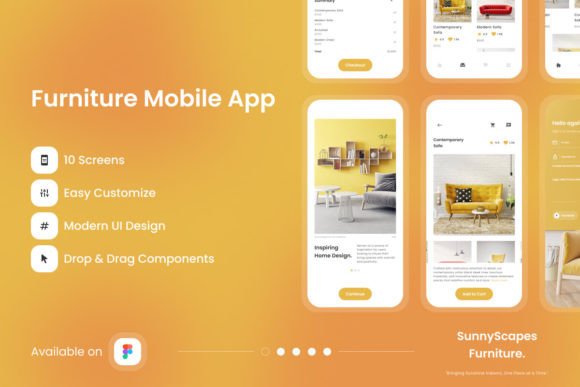
In a digital landscape often dominated by stark minimalism, the need for interfaces that radiate warmth and personality has never been greater. Sunny Scapes - Furniture Mobile App enters this space as a thoughtful UI resource designed for creators who want to blend contemporary furniture aesthetics with the inviting feel of sunlit spaces. Whether you are a freelance designer building a portfolio, a small business owner planning an e-commerce launch, or a content creator shaping a visual brand, this Figma-based system offers a structured yet flexible foundation. It moves beyond simple screen layouts into the realm of design storytelling, where every carefully selected hue and sleek interaction contributes to a narrative of comfort and elegance.
What Makes Sunny Scapes a Standout UI Resource
What separates a disposable UI kit from a lasting design system is the thought put into its architecture. Sunny Scapes demonstrates a strong command of structured design through its well-organized layers and implementation of global text and color styles. For design teams collaborating on a project, this means less time fixing inconsistencies and more time refining the user experience. The inclusion of an editable .fig file ensures that every vector, mask, and component can be adjusted without starting from scratch. Open-source fonts complement this flexibility by removing licensing barriers, making the kit accessible for commercial projects ranging from client presentations to published applications.
The high-quality screen layouts are built with an awareness of real-world usability. Visual appeal never comes at the cost of functional clarity. By providing a system that is easy to adjust, the kit empowers designers to maintain creative control while benefiting from a proven structural foundation. The global text and color styles act as a single source of truth, which is essential when scaling a project from a single prototype to a full product launch.
Creative Directions for Different Audiences
Sunny Scapes is versatile enough to serve a wide range of professional goals. Here is how different users can adapt its sun-kissed aesthetic for their specific audiences and platforms.
For Freelance Designers and Creative Studios
When pitching a rebrand to a boutique furniture store or a home decor startup, having high-fidelity visuals is critical. Sunny Scapes provides ready-to-use screens that can anchor a proposal. You can present the hero screens, product detail pages, and wishlist flows as part of a cohesive case study. The organized layers allow you to quickly swap colors and imagery to match a potential client’s brand guidelines, demonstrating both your strategic thinking and your technical proficiency in Figma. For your Dribbble or Behance portfolio, these screens immediately signal that you understand the nuances of the home and lifestyle vertical.
For Marketers and Content Creators
Consistency across social media, blog posts, and email campaigns builds brand trust. Imagine structuring a seasonal campaign around “The Art of Sunlit Spaces.” You can use the app’s hero screens to introduce different rooms, the product detail pages to discuss specific textures, and the wishlist functionality to curate a “Summer Favorites” collection for your audience. This creates an interactive bridge between the content people consume and the products they might purchase. The vibrant hues and sleek design language make thumbnails and in-feed posts more likely to stop a scroll without feeling chaotic or overly busy.
For Entrepreneurs and Small Business Owners
Validating a business idea quickly is essential. Sunny Scapes allows you to test user flows on platforms like Maze or UserTesting without investing weeks in UI design. You can focus your energy on refining the value proposition and product catalog while relying on a polished interface. The easy to adjust design language means you can prototype variations of the customer journey—such as browsing by room or by style—and gather actionable feedback on what resonates most with your target demographic before committing to full development.
For Educators and Design Students
Deconstructing a well-built Figma file is one of the fastest ways to learn industry best practices. The neatly organized layers and global styles in Sunny Scapes serve as a practical case study in component architecture and design system management. Students can explore how typographic scales work, how color palettes are applied across multiple screens, and how auto-layout can be used to maintain spacing consistency. It provides a tangible example of how professional UI kits are structured for both aesthetic impact and team collaboration.
Maintaining Consistency and Brand Identity
One of the greatest challenges in digital product design is scaling a visual identity without diluting it. This is where the global styles in Sunny Scapes prove invaluable. By adjusting the master color palette—perhaps shifting from warm terracottas to cool coastal blues for a seasonal refresh—you can systematically update every screen in minutes. Similarly, modifying the text styles ensures that typography remains harmonious across product descriptions, headlines, and call-to-action buttons.
For teams, this consistency translates directly into brand trust. Users may not consciously notice font weights or button radiuses, but they will feel the cohesion. When adapting the app for different platforms, such as iOS, Android, or even tablet breakpoints, the organized layer structure allows for platform-specific tweaks without breaking the core design. The images used for preview purposes serve as valuable placeholders that demonstrate the intended mood and scale. Replacing these with original, high-quality photography or custom illustrations will elevate the kit from a template to a unique brand experience.
To keep your results clear and audience-friendly, consider the following approach:
- Start with the emotional tone. Define what “sun-kissed comfort” means for your specific audience before making any visual changes.
- Leverage the global color styles. Use them to experiment with different emotional palettes—warm and inviting, bright and energetic, or soft and serene.
- Maintain typographic hierarchy. Use the provided open-source fonts as a foundation, and only introduce a secondary typeface if it strengthens the brand voice.
- Prototype with purpose. Use Figma’s Smart Animate to bring transitions to life, reinforcing the feeling of a fluid and intuitive shopping experience.
Practical Recommendations for Getting the Most Out of Sunny Scapes
To truly own the designs and ensure they serve your specific goals, follow these practical guidelines:
- Replace preview imagery with your own visuals. The placeholder images are carefully chosen to reflect the sunny, modern aesthetic, but original photography will make the app feel authentic to your brand. Invest in consistent product shots or lifestyle images that share a similar lighting and color profile.
- Customize the color palette strategically. Start with the global styles. If your brand leans slightly cooler, adjust the primary hues while retaining the warmth in the accent colors. This preserves the essence of Sunny Scapes while aligning it with your identity.
- Use the organized layers for rapid iteration. The logical naming and grouping make it easy to find specific elements. Use this structure to quickly generate variations—such as a “Guest” view versus a “Logged In” view—for user testing.
- Collaborate with clarity. When working in a team, use the .fig file as the single source of truth. The clean structure reduces onboarding time for new team members and minimizes the risk of design drift during sprints.
- Adapt for different touchpoints. While the kit is focused on mobile, the design system principles can extend to a responsive web version. Use the global styles as a reference to build out consistent web components that mirror the mobile experience.
Sunny Scapes is more than a collection of beautiful mobile screens; it is a practical toolkit for injecting warmth and clarity into the furniture shopping experience. By respecting the balance between aesthetic storytelling and systematic organization, it provides a genuine shortcut for creators who refuse to compromise on design quality. Whether you are sketching out a new brand identity, refining an existing product, or teaching the next generation of designers, this resource offers a sunlit path toward more engaging and effective digital spaces. The key is to explore it thoroughly, adapt it thoughtfully, and make its sense of modern comfort entirely your own.