Teacher Weekly Planner 9 – Organize Your School Week
Teaching is a profession that demands constant juggling. Between lesson plans, grading, meetings, and classroom activities, the school week can quickly become overwhelming. A simple, reliable system for managing your time makes all the difference. Teacher Weekly Planner 9 offers exactly that: a clean, printable layout designed to help you arrange your schedule with clarity and ease. This digital download gives you full control over your weekly planning without the clutter or cost of complicated apps.
What Makes This Weekly Planner Different
Many teachers rely on digital calendars or bullet journals, but sometimes a straightforward printed page is the most effective tool. Teacher Weekly Planner 9 is a printable PDF and PNG file that you can download directly to your computer. It is designed for A4 paper (11.7 x 8.3 inches) and prints best when your settings are adjusted to 100 percent scale, actual size. This ensures every section lines up perfectly on the page, giving you a crisp, usable planner every time.
The planner is a digital product only. You will not receive a physical item in the mail. Instead, you gain the flexibility to print as many copies as you need for your own classroom or personal use. If you are a seller, you may print and sell the physical copies, but the digital files themselves — in PNG or PDF format — cannot be resold or transferred. This licensing distinction matters if you plan to use the planner for a small business or as part of a printed product line.
Key Characteristics of Teacher Weekly Planner 9
Before diving into how you can use it, let's look at what this planner actually includes and why its design choices are practical for educators.
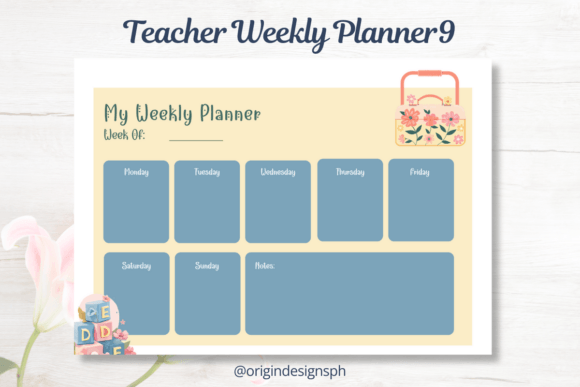
- Clean, uncluttered layout – The structure is simple: spaces for each day of the week with room to note classes, tasks, and priorities. No excessive graphics or distracting elements.
- Digital format for easy access – You download the file to your laptop or computer, which preserves resolution and quality. The product notes specifically recommend downloading only on a computer to avoid resolution and quality reduction.
- Printable on standard A4 paper – No special paper or expensive supplies required. Standard printer paper works fine, though cardstock can add durability if you plan to use it all term.
- Color may vary slightly – Because different monitors and print settings affect appearance, the actual printed colors might differ from what you see on screen. This is normal and something to keep in mind when planning your classroom aesthetic.
- Protected commercial use – You are allowed to sell printed copies, which makes this a viable option for teacher-authors, Etsy sellers, or anyone building a printed planner business.
Practical Applications for the Classroom and Beyond
Teacher Weekly Planner 9 works well in several environments. Here are realistic ways to put it to use.
Daily Lesson Planning
Each week, list your lessons by subject or class period. The layout gives you enough space to write key objectives, materials needed, and quick notes about student progress. Having everything on one page helps you see the week at a glance, so you can adjust pacing if a lesson runs long or a concept needs reteaching. This kind of overview reduces last-minute scrambling and supports smoother transitions between activities.
Tracking Administrative Tasks
Teaching involves more than instruction. You have staff meetings, parent conferences, grading deadlines, and extracurricular duties. Dedicate a section of the planner each week to these responsibilities. When everything lives in one place, it is easier to prioritize and avoid double-booking your time. You might also note which tasks require preparation ahead of time, like gathering student work samples for a meeting.
Goal Setting and Reflection
Some teachers use a weekly planner to set one or two instructional goals. For example, you might aim to incorporate more student voice in discussions or try a new formative assessment strategy. At the end of the week, a quick glance at your notes shows what worked and what needs adjustment. This reflective practice improves teaching over time and keeps your professional growth on track.
Printing for Substitutes or Assistants
When you are out sick or attending professional development, a printed planner page can serve as a quick reference for a substitute teacher. Instead of sifting through a digital calendar or trying to remember your schedule, you hand over a clear overview of the day. This saves time and reduces confusion for everyone involved.
How This Planner Supports Productivity and Focus
Productivity in teaching is not about doing more work in less time. It is about directing your energy toward what matters most. A structured weekly planner helps you:
- Avoid mental clutter – Writing down your schedule frees your brain from holding onto every detail. You can focus on teaching instead of worrying about forgetting something.
- Make intentional choices – When your week is laid out visually, you can see where your time actually goes. This makes it easier to say no to unnecessary commitments or to protect time for grading and planning.
- Reduce decision fatigue – Knowing exactly what to do each day removes the small but constant decisions that drain your energy. You simply follow the plan you set.
For those who run a side business selling educational resources or printable planners, this product also offers a straightforward way to expand your product line. Since printed copies can be sold, you can purchase the digital file, print it at home or through a local print shop, and offer it to customers who prefer physical planners. Just remember that the digital file itself cannot be shared or resold.
Practical Considerations When Using the Planner
Getting the most out of Teacher Weekly Planner 9 requires a few simple steps. Pay attention to the printing instructions to avoid common mistakes.
- Download on a computer, not a phone or tablet. This preserves the file's resolution and ensures the layout prints correctly. Mobile devices sometimes automatically compress or resize images, which can lead to blurry or misaligned pages.
- Set your printer to 100 percent scale or actual size. Many printers default to "fit to page," which can slightly shrink or expand the design. Selecting actual size guarantees the margins and spacing match the original layout.
- Use standard A4 paper (11.7 x 8.3 inches). If your printer uses letter size, check that the paper dimensions are compatible or adjust your settings accordingly. Small mismatches can shift content off the page.
- Expect minor color variation. If color accuracy is important to you, test print one page before printing a large batch. Adjust your printer settings if needed, and note that different monitors display colors differently.
Who Will Benefit Most From This Product
While the name says "teacher," this planner is versatile enough for various roles. Educators at any level — from preschool through high school — will find the layout functional. It also works for tutors, homeschooling parents, and instructional coaches who manage multiple schedules. The clean design makes it suitable for professionals in other fields who prefer a paper-based weekly overview, though the labeling and structure lean toward classroom use.
For teacher-authors and creators, this product offers a legitimate way to enter the printed planner market without designing from scratch. The license allows you to produce and sell physical copies, which fits well with Etsy shops, teacher stores, or local craft fairs. Just be clear with your customers that they are buying a printed item, not a digital download.
Final Thoughts on Using Teacher Weekly Planner 9
A good planner does not have to be complicated. Teacher Weekly Planner 9 delivers a practical, printable solution for organizing your school week without unnecessary features or digital distractions. Its straightforward layout helps you focus on what matters: your students, your lessons, and your own well-being. By taking a few minutes each week to plan ahead, you reduce stress and gain a clearer sense of direction. Whether you are a classroom veteran or just starting out, this simple tool can support your productivity and help you feel more in control of your schedule.
Download the file on your computer, print it at actual size, and see how a well-structured week changes your workflow. Small organizational habits add up, and this planner makes it easy to start.